Free SEO Tool — No Signup
Free SEO Audit Tool
Run a free website audit in seconds. Our SEO checker runs 45+ checks across 9 categories, crawls up to 5 pages of your site, scores it out of 100 with charts and priority recommendations — and gives you a detailed PDF report to keep.
2.47M+ organic clicks driven · 15M+ impressions generated · 60+ niches served
How the free SEO audit works
Enter your website
Type your web address above — your homepage is usually the best place to start. Any public page works, yours or a competitor's.
We check it live
The tool fetches your real page and runs 45+ checks across 9 categories — technical, security, speed, content, AI readiness and more — then crawls up to 5 pages of your site for duplicate titles and missing descriptions.
Get your score + PDF report
See your score out of 100 with charts, the priority fixes to make first with a recommendation for each, and download a detailed professional PDF report to keep or share.
What is an SEO audit?
An SEO audit — also called a website audit or site audit — is a structured review of everything that decides whether your website can be found, understood and ranked by search engines like Google. Where a normal visitor sees pages, an audit sees the machinery underneath: Can Google crawl this site? Is it allowed to index the pages? Do the titles and headings tell it what each page is about? Does it load fast enough, work on phones, and earn clicks when it appears?
Most websites lose traffic to a handful of fixable problems: a missing title tag, a page accidentally set to noindex, a slow server, no sitemap. A website audit finds those problems in a deliberate order — visibility first, then content, then polish — so you fix what costs you the most before what costs you the least. That is exactly the order this free SEO checker follows.
What our free website audit checks
Technical & Indexing
Whether Google can reach, crawl and index your site at all: HTTPS, noindex tags, canonicals, www consistency, robots.txt, sitemap, favicon and language settings.
Security & Server
Your SSL certificate's health and expiry, whether HTTP forces HTTPS, the security headers that protect visitors, and whether your server advertises its software versions to attackers.
Performance
How fast your server answers and how heavy your page is. Slow pages lose visitors and rankings — Google measures this directly.
On-Page SEO
The title tag, meta description and heading structure that decide what your page ranks for and how it looks in search results.
Content & Links
Whether the page has enough genuinely useful content, and whether internal links help Google find and rank the rest of your site.
Images & Media
Alt text that lets your images rank in image search, and image file sizes that quietly slow pages down.
Social & Structured Data
Open Graph and Twitter cards so shared links look professional, plus schema markup that wins rich results — stars, FAQs and business details.
Site Crawl
We also fetch up to 5 pages of your site and compare them: broken pages, duplicate titles competing with each other, and pages missing their meta descriptions.
Mobile, AI & Tracking
Mobile-friendliness, llms.txt readiness for AI search engines like ChatGPT and Gemini, and analytics so you can measure what SEO brings you.
Then a human goes deeper
The instant audit covers one page's health. Our free full audit adds your keyword rankings, backlink profile and the competitors beating you — reviewed by our technical SEO team.
Request the Full Free AuditThe SEO audit checklist behind this tool
Every run works through the same website audit checklist our team uses for client sites — 45+ checks, grouped so the most damaging problems surface first.
Technical & Indexing
- HTTPS security
- Noindex / indexing status
- Canonical tag
- www vs non-www consistency
- robots.txt file
- XML sitemap
- Favicon
- Language & encoding
Security & Server
- SSL certificate & expiry
- Security headers
- HTTP to HTTPS redirect
- DMARC record
- SPF record
- Email privacy
- Server version disclosure
Performance
- Server response time
- Page size (HTML weight)
- JS & CSS file count
- Text-to-HTML ratio
- iFrames & inline styles
On-Page SEO
- Title tag length & presence
- Meta description
- Single H1 heading
- H2 sub-heading structure
- Heading order
- URL structure
Content & Links
- Content amount (word count)
- Internal linking
- Anchor text quality
- Contact & social presence
Images & Media
- Image alt text coverage
- Image file sizes
- Modern formats (WebP/AVIF)
- Responsive images (srcset)
Social & Structured Data
- Open Graph tags
- Twitter card tags
- Structured data (JSON-LD schema)
Mobile, AI & Tracking
- Mobile viewport
- llms.txt for AI search
- AI crawler access in robots.txt
- Analytics tracking detection
Site Crawl
- Pages checked across the site
- Duplicate page titles
- Pages missing descriptions
- Broken pages
Free instant audit vs full manual audit
Instant audit — this page
Free · results in seconds · no signup
- One page (usually your homepage), checked live
- 45+ technical, security and on-page checks in 9 categories
- Score out of 100 with every problem explained
- Downloadable PDF report
- Best for: a fast health check and a fix list
Full manual audit
Free too · prepared by our team · by request
- Your whole site — every important page
- Keyword rankings: what you rank for, what you should
- Backlink profile and toxic-link risks
- Competitor gap analysis — why they outrank you
- A step-by-step fix plan in priority order
What your audit report looks like
No raw data dumps. You get a score out of 100, a score for each of the 9 categories, and every problem paired with its fix — ordered by what it is costing you, not by how easy it is.
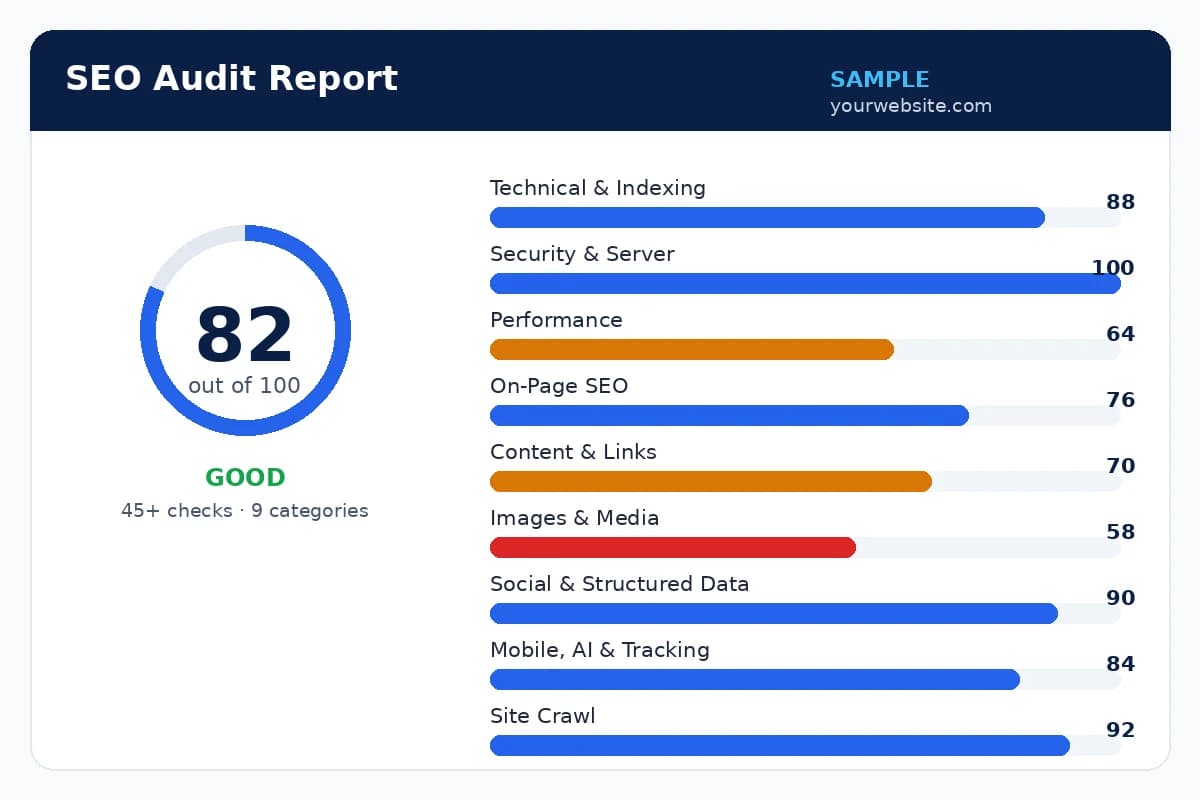
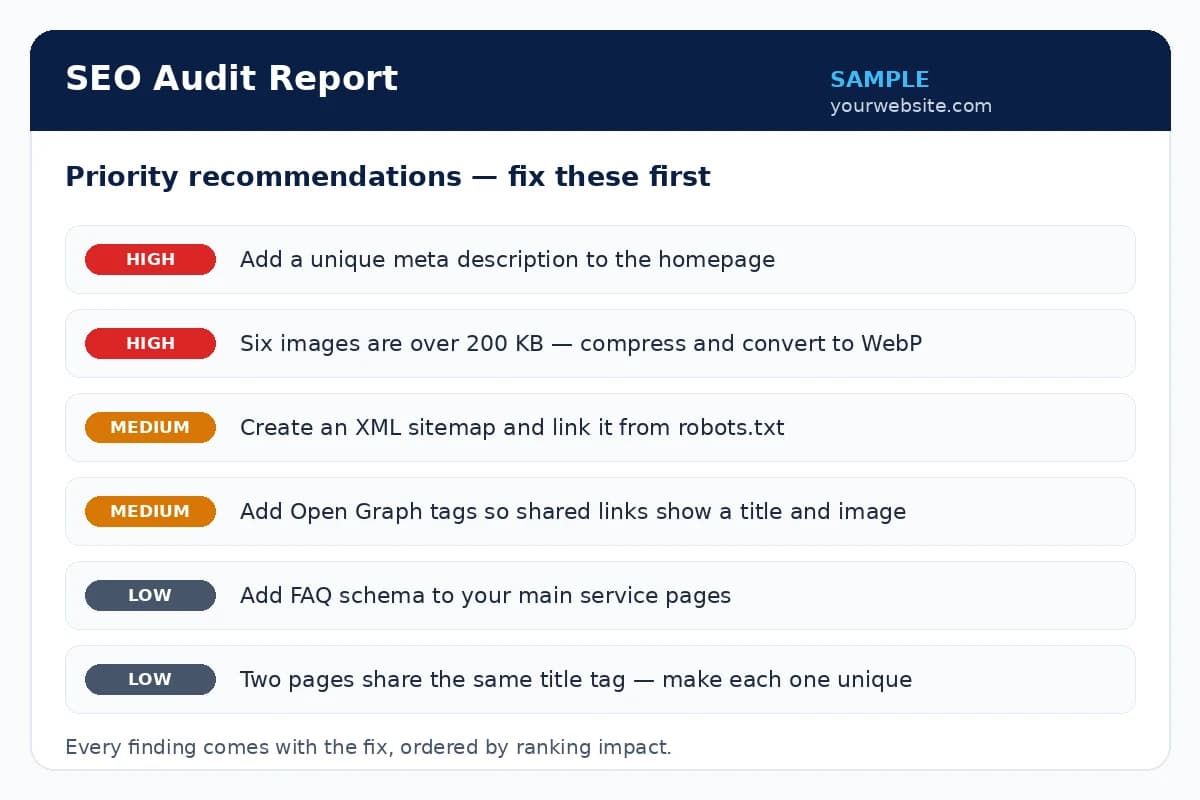
Sample screens — your report is generated live from your own website, with your real findings.
What your SEO score means
Your score is the share of available points your page earned across all 45+ checks — the important failures cost the most points, so the number always reflects damage, not cosmetics. Here is how to read it:
- 90–100 · Excellent
- The page's technical and on-page basics are in strong shape. Remaining points are polish — richer schema, faster images, deeper content. Focus shifts from fixing to growing: keywords, content and links.
- 75–89 · Good
- Fundamentally sound, with a handful of real issues — often speed, image weight or missing social/schema tags. Work through the warnings in the report and most of the gap closes in a day or two.
- 55–74 · Needs work
- Something material is leaking traffic: weak titles, thin content, slow responses or crawl problems. Start with the Priority Fixes in your report — they are ordered by ranking impact, not by how easy they are.
- Below 55 · Poor — urgent fixes needed
- The page has problems that actively block ranking — indexation blocks, missing core tags, failing mobile or security issues. Fix the failures before spending anything on content or links; until then, that spending is wasted.
What to do with your audit results
A report only matters if something changes because of it. There are three honest ways forward — pick the one that fits your time and skills.
Fix it yourself
Every finding in the report comes with the fix written out. Work down the priority list, then run the audit again — your score should climb as each fix lands. Most owners clear the high-impact items in a few evenings.
Hand it to your developer
Download the PDF report and send it to whoever maintains your site. It turns a vague “the website feels slow” into a specific list they can quote, schedule and tick off — and you can re-run the audit to verify the work afterwards.
Let us fix it for you
No time, or the fixes are beyond your setup? Our technical SEO team works from this exact report — failures first, in priority order — and reports every month on what changed.
Request the Full Free AuditCommon problems this audit finds — and how to fix them
Missing or weak title tags
Every important page needs a unique title of roughly 30–60 characters that leads with what the page offers and the words customers actually search for.
Pages blocked by noindex or robots.txt
One wrong setting can remove a page — or a whole site — from Google. Check indexing settings after every redesign, migration or CMS update.
Slow server response
Better hosting, caching and lighter pages. Speed work is unglamorous and is often the single biggest ranking unlock for small sites.
No XML sitemap
Generate a sitemap, link it from robots.txt and submit it in Google Search Console so every important page gets discovered.
Thin content
Pages need enough genuinely useful text to deserve a ranking. Answer the visitor's real questions better than the pages currently above you.
No structured data
Add schema for your business type, FAQs and reviews where they honestly apply — rich results earn more clicks from the same position.
Prefer to have it handled? Our on-page SEO and full SEO services start from exactly this list — we fix the audit findings in priority order and report the results every month.
Who should run a website audit?
Small business owners
Your website should be bringing enquiries while you work. An audit shows whether Google can even find it — and what is quietly blocking the phone from ringing.
Online stores
Product and category pages compete hard. Speed, thin content and missing schema are the three leaks we see most in e-commerce audits.
Local businesses
Clinics, restaurants, law firms, trades — if customers search 'near me', your technical basics decide whether you appear at all. Pair this with our local SEO service for the map pack.
Anyone briefing a developer
Download the PDF report and hand it to whoever maintains your site. It turns 'the website feels slow' into a specific, checkable fix list.
More free SEO tools
Every tool here is free, needs no signup, and works with the others — audit the site, research the keywords, check your rankings, check the links, and get AI-ready.
Keyword Research Tool
Free keyword ideas, difficulty scores & search trends
Use this tool →SERP Rank Checker
Your Google position for 5 keywords, by country & device
Use this tool →Backlink Checker
Referring domains & Domain Score for any website
Use this tool →AI Visibility Checker
Is your site ready for ChatGPT & AI search? Free Fix Pack
Use this tool →SERP Analyzer
Top-10 headings compared — content gaps, outline & brief generator, free
Use this tool →Free SEO audit — frequently asked questions
What is an SEO audit?
An SEO audit is a structured health check of a website's ability to rank in search engines. It reviews technical issues (crawling, indexing, speed), on-page elements (titles, headings, content), and off-page signals (backlinks). A good audit ends with a prioritised list of fixes — what is broken, what it is costing you, and what to repair first.
How do I audit my website for free?
Enter your website address in the tool at the top of this page. It fetches your live page and runs 45+ technical, security, on-page, content, speed and AI-readiness checks across 9 categories, crawls up to 5 pages of your site, then scores it out of 100 with charts, priority recommendations and a free detailed PDF report. For a deeper review — keyword rankings, backlinks and competitor analysis — request the free full audit and our team will prepare it manually.
What does this free website audit check?
Nine categories: technical health and indexing (HTTPS, noindex, canonical, robots.txt, sitemap), security and server (SSL certificate, security headers), performance (server response time, page size, file counts), on-page SEO (title, meta description, headings, URL), content and internal links, images and media, social tags and structured data, mobile / AI-search readiness, and a site crawl that checks more of your pages for duplicate titles, missing descriptions and broken pages. Add an optional keyword and it also scores how well the page targets it.
Is the audit really free? Do I need to sign up?
Yes — the instant audit and the PDF report are completely free, with no signup, no email address and no card. It is the same first-pass check we run for paying clients. If you want the deeper manual audit afterwards, that is free too; you only ever pay if you hire us to do the fixing.
What is a good SEO audit score?
90–100 is excellent, 75–89 is good, 55–74 means the basics need work, and below 55 usually means fixable problems are actively holding the site back. The score covers the on-page and technical health of the page you entered — it is a health measure, not a ranking guarantee, and the checklist under it matters more than the number itself.
How often should I run a site audit?
Run a quick audit monthly, and a full audit every quarter — plus immediately after a redesign, a domain or hosting change, a CMS update, or any sudden drop in traffic. Settings like noindex and robots.txt can be reset by updates without anyone noticing.
Can I download my audit as a PDF?
Yes. Every report has a Download PDF Report button that creates a professional, print-ready PDF of your full results — handy for sharing with your team or your developer. The PDF carries our branding because the tool is ours; the findings are yours to act on with whoever you choose.
I can't fix the problems myself — can you fix them for me?
Yes — fixing audit findings is exactly what our technical SEO service does. We work from the same report you downloaded: the failures first, in the report's priority order, then the warnings. You get a monthly report showing what was fixed and what it changed in clicks, impressions and rankings. Ask for the free full audit on the contact page and mention your score — we will pick it up from there.